



Sheet-to-Doc for Mac
- Trial version
- 4.5
- V2.15.0
Download for Mac
View an ad to download for free

- WTSolutions
Write Excel/CSV/JSON/JSONL data into Word templates and batch generation of Word documents
Overview
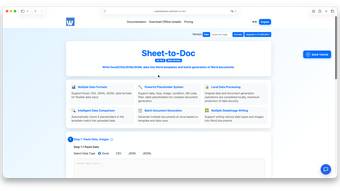
Tired of copying Excel data into Word templates over and over? Traditional mail merge only supports simple text replacement and fails complex files with images, QR codes or conditional logic. Sheet-to-Doc is a powerful data-driven document automation tool. With one click, you can batch import data from Excel, CSV, JSON and JSONL into Word templates to generate fully customized documents. It delivers far more advanced capabilities than standard mail merge, serving individual users, students, freelancers and large enterprises across all industries.
Who Is This Tool For?
Administrative & accounting staff, architects & engineers, data analysts, business owners, freelancers, home users, corporate teams, project managers, scientific researchers, self-learners, digital nomads, university students, general office workers. Common use cases: sales contracts, financial reports, invoices, personalized letters, admission notices, research papers, certificates and custom personal documents.
Key Differentiator
Unlike basic Word Mail Merge, Sheet-to-Doc supports 7+ powerful placeholder types: data block, loop, nested loop, conditional logic, image, QR code, dynamic table and data filter, allowing you to build complex multi-layer documents with images and dynamic content. All exported Word files can be password encrypted for sensitive business data.
Core Features
Multi-format Data Input Fully compatible with Excel (.xlsx), CSV, JSON, JSONL. Upload files or paste raw data directly without format conversion.
All-in-one Smart Placeholder System No coding required. Use simple template syntax to realize repeating blocks, conditional display, embedded images, auto-generated QR codes and dynamic tables to build sophisticated report & contract layouts.
Local Data Processing & Top-Tier Security All data parsing and document rendering run locally on your device. Your spreadsheets and templates will never be uploaded to cloud servers, fully protecting confidential financial, client and research information.
Auto Template & Data Matching Check The tool automatically cross-verify placeholders in Word templates against your dataset columns, alerting mismatched or missing fields to avoid blank or wrong content in finished files.
Dual Document Generation Modes
One independent Word file per data row (for invoices, notices, contracts)
Merge all rows into a single combined document (for summary reports) Custom dynamic filenames and save paths based on your data fields to skip manual renaming.
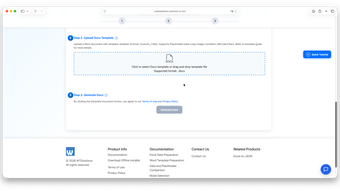
Embed Images & Dynamic QR Codes Auto insert images from file paths stored in your data, plus generate unique QR codes for links, contact info or product details inside Word documents.
Document Encryption & Custom Metadata Set open passwords for generated files and customize "modified by" information for internal & external distribution.
4 Cross-Platform Editions (Identical Full Features)
Web Version: Open in browser, zero installation, auto-updated
PWA Version: Install from Microsoft Store for desktop-like experience
Excel / WPS Add-in: Built into spreadsheet software for seamless workflow
Offline Desktop: Windows / Mac / Linux support, works without internet, all data stored locally
Clear & Simple Pricing
Free Plan ($0, for personal trial)
Max 10 data rows & 10 images per batch
Basic document generation for small-scale testing
Pro Subscription ($2.66/month, Web/PWA/Add-in)
Unlimited rows & images
Custom "last modified by" info, no footer ads, free continuous updates
Pro Lifetime License ($14.99 per device, Offline Desktop)
One-time purchase for permanent offline access
Unlimited data & images, full professional features, lifetime free updates
Why Sheet-to-Doc?
Save hours of repetitive manual copy-paste work
Zero technical skills needed; master template editing in 5 minutes
More capable than mail merge for complex graphic & logical documents
Local processing + password encryption for maximum data privacy
Flexible access via web, plugin or offline desktop for all scenarios
Transparent pricing with free trial and two cost-effective upgrade options
Loading…
App specs
Developer
- WTSolutions
License
Trial version
Version
2.15.0
Latest update
Platform
Mac
OS
OS X 10.11
Language
English
Available languages
- English
- Chinese
Size
101.56 MB
Sheet-to-Doc for Mac
- Trial version
- 4.5
- V2.15.0
Download for Mac
View an ad to download for free
User reviews about Sheet-to-Doc
Have you tried Sheet-to-Doc? Be the first to leave your opinion!
Add reviewTop downloads Office Suites for Mac
Top downloads Office Suites for Mac

Microsoft Word
A free tool that empowers your productivity
Microsoft Excel
Structured spreadsheets for serious data work

Microsoft PowerPoint
Presentation control for clear slide narratives

Microsoft 365
Download Microsoft 365 for Mac: Unlock the power of the cloud and Microsoft software

LibreOffice
Comprehensive Free Office Suite for Mac
Top downloads Office Suites for Mac
Microsoft Word
A free tool that empowers your productivity
Microsoft Excel
Structured spreadsheets for serious data work
Microsoft PowerPoint
Presentation control for clear slide narratives

Microsoft Office 2016
Download Microsoft Office for Mac: Word, PowerPoint, and more
Microsoft 365
Download Microsoft 365 for Mac: Unlock the power of the cloud and Microsoft software
Related topics about Sheet-to-Doc
Latest articles

Mortal Shell is the only soulslike that has managed to understand the essence of soulslikes, and its sequel looks like it can double down on what the original did well

Emily Watson reveals that she came close to never acting because she grew up in a religious sect

TikTok wants to allow payments via DM, is that a good idea?

Chatbots and ‘sentient’ AI talk: makers could dodge blame as cases climb
Google Pixel 11 now turns ringtones into custom vibrations
Laws concerning the use of this software vary from country to country. We do not encourage or condone the use of this program if it is in violation of these laws. Softonic may receive a referral fee if you click or buy any of the products featured here.